계속 해보려다가 잊어버린 Localization 기능을 써봤습니다.
간단한 StringTable을 적용했고 AssetTable을 이용해 언어별 폰트도 자동으로 적용되도록 만들어봤습니다.
영상 자~~~~~~~~세히 보면 텍스트가 바뀔 때마다 폰트도 바뀝니다.
한국어 버튼 클릭 -(Locale 변경)-> ㅁㅁㅁ(기본 폰트라 한글이 깨짐) -(폰트 변경)-> 한글
폰트가 먼저 바뀌어야 하는게 맞을 것 같긴 하니 추후 좀 더 다듬어야겠네요.
using System.Collections.Generic;
using System.Linq;
using TMPro;
using UnityEngine;
using UnityEngine.Localization;
using UnityEngine.Localization.Settings;
using UnityEngine.Localization.Tables;

#if UNITY_EDITOR
using UnityEditor.Localization;
#endif

[ExecuteInEditMode]
[RequireComponent(typeof(TextMeshProUGUI))]
public class LocalizeFontEvent : MonoBehaviour
{
  [SerializeField] private LocalizedTmpFont fontReference = new();
  [Space(5)]
  [SerializeField] private List<TextMeshProUGUI> textmeshPros = new();

#if UNITY_EDITOR
  private bool TryAssignExistingFontTable(out LocalizedTmpFont assetReference)
  {
    assetReference = new LocalizedTmpFont();

    // ✅ 1. 모든 Asset Table Collection 가져오기
    var collections = LocalizationEditorSettings.GetAssetTableCollections();

    foreach (var collection in collections)
    {
      foreach (var table in collection.Tables)
      {
        var assetTable = table.asset as AssetTable;
        if (assetTable == null) continue;

        // 테이블의 첫 엔트리를 확인하여 타입 판정
        foreach (var entry in assetTable.SharedData.Entries)
        {
          var handle = assetTable.GetAssetAsync<TMP_FontAsset>(entry.Key);
          var asset = handle.Result;

          if (asset is TMP_FontAsset) // ✅ 여기서 타입 판정
          {
            assetReference.TableReference = collection.TableCollectionName;
            assetReference.TableEntryReference = entry.Key;
            return true;
          }
        }
      }
    }

    return true;
  }

  private void OnEnable()
  {
    if(fontReference.IsEmpty && TryAssignExistingFontTable(out var assetReference))
      fontReference = assetReference;

    if (textmeshPros.Count == 0)
      CacheAllTMP();

    RefreshFont();
    Register();
  }
#endif

  private void OnDisable()
    => Unregister();

  private void OnDestroy()
    => Register();


  private void RefreshFont()
  {
    var handle = fontReference.LoadAssetAsync();
    var currentTMP = handle.Result;

    foreach (var tmp in textmeshPros)
      tmp.font = currentTMP;
  }

  private void Register()
  {
    LocalizationSettings.SelectedLocaleChanged += OnLocaleChanged;
    fontReference.AssetChanged += OnAssetChanged;
  }

  private void Unregister()
  {
    LocalizationSettings.SelectedLocaleChanged -= OnLocaleChanged;
    fontReference.AssetChanged -= OnAssetChanged;
  }

  private void OnLocaleChanged(Locale locale)
  {
    RefreshFont();
  }

  private void OnAssetChanged(TMP_FontAsset fontAsset)
  {
    RefreshFont();
  }

  [ContextMenu("Cache All TMP")]
  private void CacheAllTMP()
  {
    textmeshPros = GetComponentsInChildren<TextMeshProUGUI>().ToList();
  }
}
위쪽 주석 부분은 당연히 채찍피티가 만들어준 부분입니다.
고마워요 스카이넷~~~~
LocalizeAsset<T>.AssetChanged는 테이블 상 에셋이 변경되었을 때,
LocalizatoinSetting.SelectedLocaleChanged는 Locale이 바뀌었을 때 호출입니다.
ExecuteInEditMode를 달아뒀고 OnEnable부터 콜백 등록을 하기 때문에 에디터 상에서 변화가 일어났을 때도 안심데스
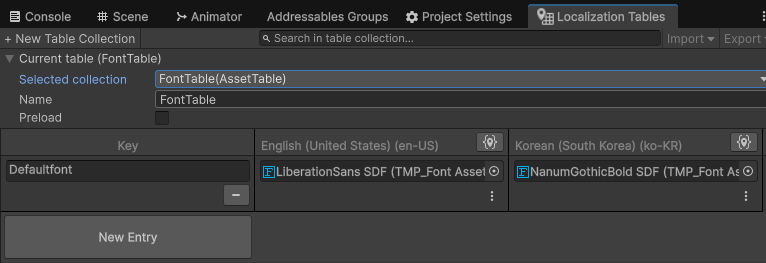
AssetTable 형태로 테이블을 만들어준 후 언어별 폰트를 넣어줍니다.
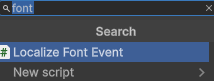

원하는 위치(TMP 혹은 그 루트)에 LocalizeFontEvent 컴포넌트를 붙여주면 LocalizeStringEvent와 비슷한 효과를 볼 수 있습니다.
로컬라이끼얏호우~
'무제_LR' 카테고리의 다른 글
| ScriptableObject는 항상 동일한 인스턴스가 아니다?!?!?!?!?!?!?!?!?!?!?!? (0) | 2025.11.13 |
|---|---|
| ScriptableObject로 전역 이벤트 써먹기 (0) | 2025.11.12 |
| UI,,,,,구조,,,,및,,,,,매니저,,,인터페이스화,,,,,,,, (0) | 2025.11.10 |
| 스테이지 생성(트리거 타일) (0) | 2025.11.06 |
| 스테이지 생성(타일맵) (0) | 2025.11.06 |