public interface ITransformController
{
  public void SetRoot(Transform root);

  public void SetActive(bool isActive);

  public void SetLocalPosition(Vector3 position);

  public void SetWorldPosition(Vector3 worldPosition);

  public void SetEuler(Vector3 euler);

  public void SetRotation(Quaternion rotation);

  public void SetScale(Vector3 scale);
}
public interface IRigidbodyController
{
public void AddRelativeForce(Vector3 localForce);
}
public interface IPlayerView : ITransformController
{
  public void AddForce(Vector3 force);

  public void RemoveForce(Vector3 force);
}
View에는 Transform이랑 Rigidbody를 컨트롤할 인터페이스를 달았습니다.
public class BasePlayerView : MonoBehaviour, IPlayerView
{
  [SerializeField] private Rigidbody rigidBody;

  private readonly List<Vector3> inputForces = new();

  private void FixedUpdate()
  {
    var velocity = inputForces.Count > 0 ? inputForces.Aggregate((force1, force2) => force1 + force2)
                                      : Vector3.zero;
      rigidBody.linearVelocity = velocity;
  }

  public void AddForce(Vector3 force)
    => inputForces.Add(force);

  public void RemoveForce(Vector3 force)
    => inputForces.Remove(force);
    //이하생략
}
Input.GetAxisValue(Horizontal/Vertical)처럼 상하좌우로 설정된 InputAction들의 값을 전부 적용시켜야 하니
외부에서 받은 벡터들의 합만큼 속도를 설정합니다.
생각해보니까 List로 저장하고 매번 연산시키기보단 걍 AddForce/RemoveForce에서 더하기/빼기로 처리해도 되지 않았을까 싶네요.
public enum Direction
{
  Up,
  Down,
  Left,
  Right,
}
public interface IMoveController
{
  public void CreateMoveInputAction(string path, Direction direction);

  public void EnableInputAction(Direction direction, bool enable);

  public void EnableAllInputActions(bool enable);
}

public interface IPlayerPresenter: IMoveController
{
  public void Initialize(IPlayerView view, PlayerModel model);

  public void SetEnable(bool isEnable);
}
적당히 상하좌우 enum을 만들어주고 이 타입을 받는 IMoveController를 만들어 IPresenter에 붙였습니다.
굳이 외부에서 InputAction을 만들어주고 또 Presenter에 넣어주기보단 Presenter가 혼자 만들어 저장하도록 구성하는게 맞지 않을까 싶습니다.
private readonly Dictionary<Direction, InputAction> moveInputActions = new();
//중략
public void CreateMoveInputAction(string path, Direction direction)
  {
    var vectorDirection = model.ParseDirection(direction);
    moveInputActions[direction] = FactoryManager.Instance.InputActionFactory.Get(path, OnMove);

    void OnMove(InputAction.CallbackContext context)
    {
      switch (context.phase)
      {
        case InputActionPhase.Started:
          view.AddForce(vectorDirection);
          break;

        case InputActionPhase.Performed:
          break;

        case InputActionPhase.Canceled:
          view.RemoveForce(vectorDirection);
          break;
      }
    }
  }
CreateMoveInputAction은 대강 이렇습니다.
model.ParseDirection은 상하좌우 enum을 내 모델이 가지고 있는 상하좌우에 해당하는 벡터값으로 변환해줍니다.
생성한 InputAction은 각 방향과 쌍을 이뤄 저장해놓고 쉽게 Enable()/Disable()시킬 수 있게 합니다.
public class PlayerModel
{
  private readonly Vector3 up;
  private readonly Vector3 down;
  private readonly Vector3 left;
  private readonly Vector3 right;

  public PlayerModel(
    Vector3 up,
    Vector3 down,
    Vector3 left,
    Vector3 right)
  {
    this.up = up;
    this.down = down;
    this.left = left;
    this.right = right;
  }

  public Vector3 ParseDirection(Direction direction)
    => direction switch
    {
      Direction.Up => up,
      Direction.Down => down,
      Direction.Left => left,
      Direction.Right => right,
      _ => throw new System.NotImplementedException(),
    };
}
아직 모델에 뭐 넣을 단계는 아니기 때문에 방향 값만.
이후 개발에 따라 상하좌우 이동 방향을 반대로 만들 수도 있겠죠.
public class StageManager : MonoBehaviour
{
    public static StageManager instance;

  [SerializeField] private PlayerSetupService playerSetupService;

  private void Awake()
  {
    instance = this;
  }

  private void Start()
  {
    playerSetupService.SetupAsync().Forget();
  }
}
씬을 실행하면 StageManager가 PlayersetupService에게 플레이어 셋업 메서드를 호출합니다.
Awake에서 실행하는게 안전하겠지만 지금은 이니셜라이즈 씬이 없는 관계로 추후 호출할 싱글톤 FactoryManager가 만들어진 후인 Start에서 실행합니다.
public class PlayerSetupService : MonoBehaviour, IStageObjectSetupService<BasePlayerPresenter>
{
  [SerializeField] private BasePlayerView testLeftPlayerView;
  [SerializeField] private BasePlayerView testRightPlayerView;

  private IPlayerPresenter leftPlayer;
  private IPlayerPresenter rightPlayer;

  public async UniTask SetupAsync()
  {
    leftPlayer = await CreateLeftPlayer();
    rightPlayer = await CreateRighPlayer();

    leftPlayer.EnableAllInputActions(true);
    rightPlayer.EnableAllInputActions(true);
  }

  public void Release()
  {
    throw new System.NotImplementedException();
  }

  private async UniTask<IPlayerPresenter> CreateLeftPlayer()
  {
    var leftView = testLeftPlayerView;
    var model = new PlayerModel(Vector3.up,Vector3.down,Vector3.left,Vector3.right);
    var presenter = new BasePlayerPresenter();
    presenter.Initialize(leftView, model);
    presenter.CreateMoveInputAction(InputActionPaths.ParshPath(KeyCode.W), Direction.Up);
    presenter.CreateMoveInputAction(InputActionPaths.ParshPath(KeyCode.D), Direction.Right);
    presenter.CreateMoveInputAction(InputActionPaths.ParshPath(KeyCode.S), Direction.Down);
    presenter.CreateMoveInputAction(InputActionPaths.ParshPath(KeyCode.A), Direction.Left);

    await UniTask.CompletedTask;
    return presenter;
  }

  private async UniTask<IPlayerPresenter> CreateRighPlayer()
  {
    var leftView = testRightPlayerView;
    var model = new PlayerModel(Vector3.up, Vector3.down, Vector3.left, Vector3.right);
    var presenter = new BasePlayerPresenter();
    presenter.Initialize(leftView, model);
    presenter.CreateMoveInputAction(InputActionPaths.ParshPath(KeyCode.UpArrow), Direction.Up);
    presenter.CreateMoveInputAction(InputActionPaths.ParshPath(KeyCode.RightArrow), Direction.Right);
    presenter.CreateMoveInputAction(InputActionPaths.ParshPath(KeyCode.DownArrow), Direction.Down);
    presenter.CreateMoveInputAction(InputActionPaths.ParshPath(KeyCode.LeftArrow), Direction.Left);

    await UniTask.CompletedTask;
    return presenter;
  }
}
플레이어 관련 Service는 적당히 생성 및 초기화, 제거 정도면 있으면 될 것 같습니다.
작동하는지 테스트하는 단계라 플레이어는 리소스 호출이 아니라 간단히 인스펙터에서 땡겨 오는 방식으로만 실행했습니다.
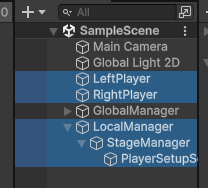
하이라키는 요렇게, BasePlayerView가 달린 플레이어 두개를 미리 만들어두었습니다.
움직이는 레후~
다음 목표:
좌/우 플레이어 모델 테이블화
리소스매니저 구현 및 Addressable을 통한 플레이어 오브젝트 생성과 초기화
'무제_LR' 카테고리의 다른 글
| 스테이지 생성(트리거 타일) (0) | 2025.11.06 |
|---|---|
| 스테이지 생성(타일맵) (0) | 2025.11.06 |
| 스테이지 데이터 구조 (0) | 2025.11.03 |
| Addressable 구조 구현, 테이블 적용 (0) | 2025.11.02 |
| 첫 기획 - 구조 잡아보기 (0) | 2025.10.30 |