

목표: 여러 오브젝트를 경유하는 움직임에도 AnimationCurve를 적용하기
저번 포스팅에서 AnimationCurve를 적용해 부드러운 직선 움직임을 만들어 보았습니다.
이번엔 여러 경유지를 통틀어 곡선 움직임을 보여주는 스크립트를 제작해봤습니다.
public class test : MonoBehaviour
{
  [SerializeField] private AnimationCurve MyCurve = null;
  [SerializeField] private List<Transform> Targets= new List<Transform>();

  private void Awake()=> StartCoroutine(movecoroutine());

  [SerializeField] private float TargetTime = 7.0f;
  private IEnumerator movecoroutine()
  {
    float _time = 0.0f;
    int _currentindex = 0;
    Transform _start = Targets[_currentindex];
    Transform _end = Targets[_currentindex+1];
    float _curvevalue = 0.0f, _movevalue = 0.0f;
    float _unit = 1.0f / (float)(Targets.Count-1);
    while (_time< TargetTime)
    {
      _curvevalue = MyCurve.Evaluate(_time / TargetTime);	//curvevalue: 전체 시간에 따른
      														//MyCurve의 y 값
      if (Mathf.FloorToInt(_curvevalue/_unit)>_currentindex)
      {
        _currentindex++;					//단계에 따라 Lerp의 시작,도착이
        _start = Targets[_currentindex];	//다음 쌍으로 넘어감
        _end = Targets[_currentindex + 1];
      }
      _movevalue = (_curvevalue - _currentindex * _unit) / _unit;
      										//movevalue: 현재 lerp에 사용될 이동 비율
      transform.position = Vector2.Lerp(_start.position, _end.position, _movevalue);
      _time += Time.deltaTime;
      yield return null;
    }
    transform.position = _end.position;
  }
}
기본적으로 경로들을 Lerp로 움직입니다.
경로의 인덱스를 다음으로 넘기는 기준이 시간이 아닌 Curve의 y값이라는 점이 다릅니다.
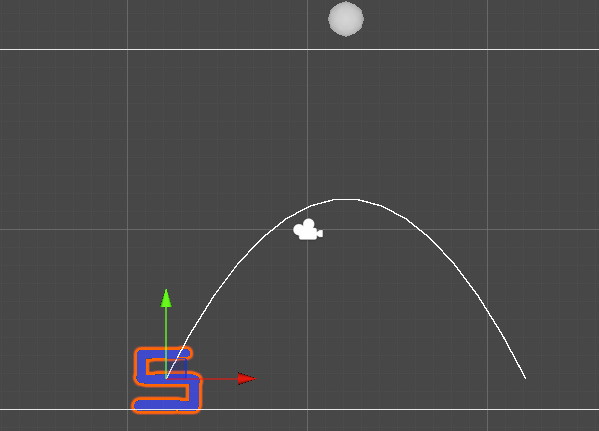
생각해보니 베지어 곡선에 적용하면 더 이쁘게 움직이지 않을까 해서 만들어봤습니다.
public class test : MonoBehaviour
{
  [SerializeField] private AnimationCurve MyCurve = null;

  private void Awake()=> StartCoroutine(BezierCurve());

  [SerializeField] private float TargetTime = 7.0f;
  [SerializeField] private Vector3 BezierMiddle = new Vector3(5.0f, 10.0f);
  [SerializeField] private Vector3 BezierEnd = new Vector3(10.0f, 0.0f);
  private IEnumerator BezierCurve()
  {
    Vector3 _startpos = transform.position;
    Vector3 _middlepos = _startpos + BezierMiddle;
    Vector3 _endpos = _startpos + BezierEnd;
    Vector3 _p1=Vector3.zero, _p2=Vector3.zero;
    float _time = 0.0f;
    while (_time < TargetTime)
    {
      _p1=Vector3.Lerp(_startpos, _middlepos, _time);
      _p2=Vector3.Lerp(_middlepos, _endpos, _time);
      transform.position = Vector3.Lerp(_p1,_p2,_time);

      _time += Time.deltaTime;
      yield return null;
    }
  }
  [SerializeField] private float GizmoDetail = 10.0f;

  private List<Vector3> GizmoDots= new List<Vector3>();
  private void OnDrawGizmosSelected()
  {
    GizmoDots.Clear();

    if (GizmoDetail < 1 ) return;
    Vector3 _startpos = transform.position;
    Vector3 _middlepos = _startpos + BezierMiddle;
    Vector3 _endpos = _startpos + BezierEnd;
    Vector3 _p1 = Vector3.zero, _p2 = Vector3.zero;

    float _t = 0.0f;
    for (int i=0;i<GizmoDetail;i++)
    {
      _t = i / GizmoDetail;
      _p1 = Vector3.Lerp(_startpos, _middlepos, _t);
      _p2 = Vector3.Lerp(_middlepos, _endpos, _t);
      GizmoDots.Add(Vector3.Lerp(_p1, _p2, _t));
    }
    for(int i=0;i<GizmoDots.Count-1;i++)
      Gizmos.DrawLine(GizmoDots[i], GizmoDots[i+1]);
    Gizmos.DrawLine(GizmoDots[GizmoDots.Count - 1], _endpos);

    Gizmos.DrawSphere(_middlepos, 0.5f);
  }
}
일반(_time/TargetTime) 움직임
    float _value = 0.0f;
    while (_time < TargetTime)
    {
      _value = MyCurve.Evaluate(_time / TargetTime);
      _p1=Vector3.Lerp(_startpos, _middlepos, _value);
      _p2=Vector3.Lerp(_middlepos, _endpos, _value);
      transform.position = Vector3.Lerp(_p1,_p2, _value);

      _time += Time.deltaTime;
      yield return null;
    }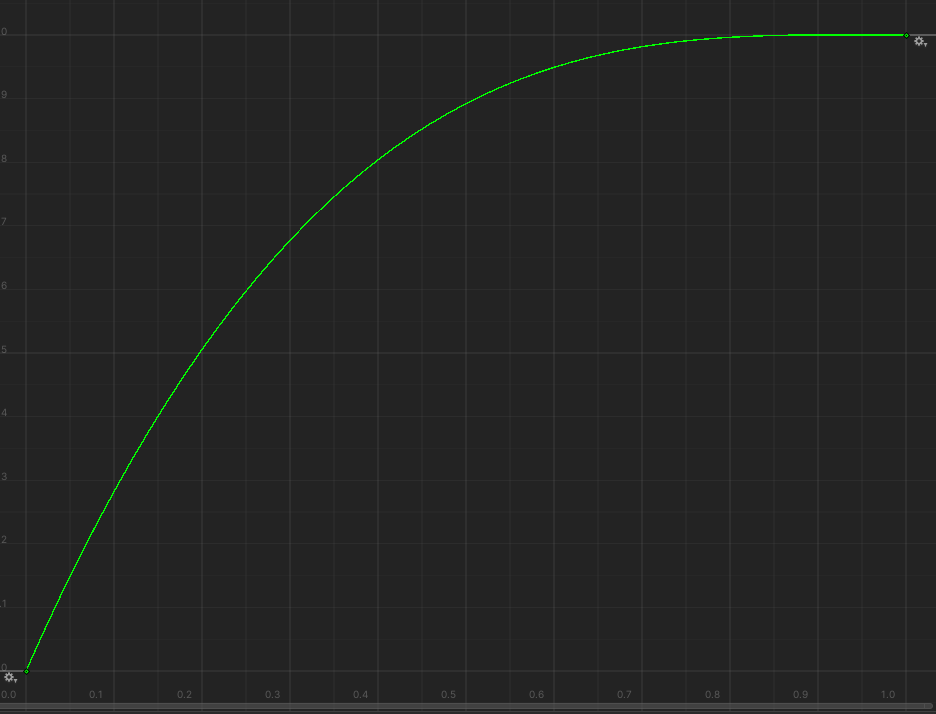
아무래도 사용하기 나름인것 같습니다.
'C#,Unity' 카테고리의 다른 글
| Unity - 오브젝트 클릭 이벤트 만들기(IPointer,RayCast) (1) | 2024.05.14 |
|---|---|
| Unity - Google Spreadsheet 연동하기(실시간X) (0) | 2024.05.13 |
| Unity - 순차적으로 진행되는 코루틴 대기열 만들기(Queue 활용) (0) | 2024.05.09 |
| Unity - Coroutine을 변수로 사용하기 (0) | 2024.05.09 |
| Unity UI - 화면을 벗어나지 않은 UI 만들기 (0) | 2024.05.08 |

